Change BrandWell Project Settings
There are other custom settings for your project that you may want to review and edit before having the AI write your first article.
To start, enter your project by clicking it.
Then, click the gear icon in the upper right corner of your dashboard.
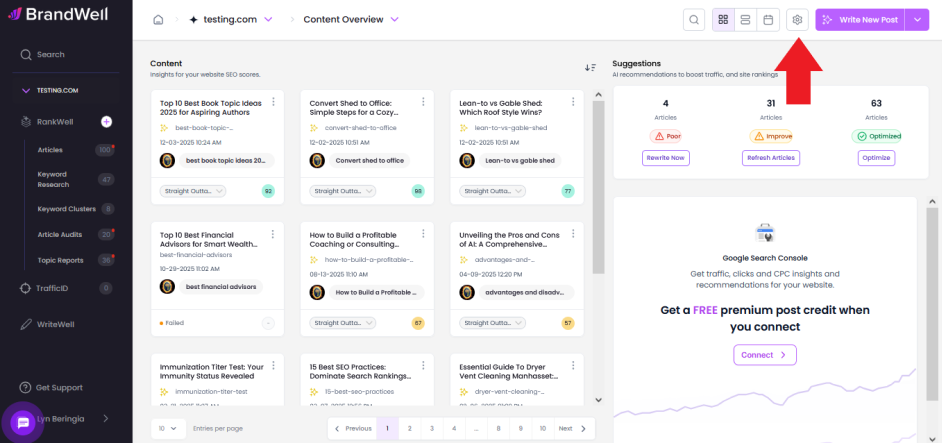
You'll get the option to change 6 different Project Settings categories:
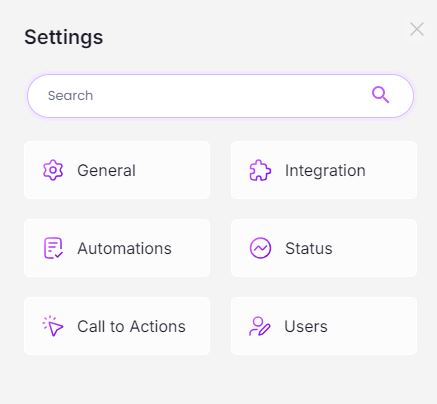
Here's what each one is for:
 General:
These are the settings you filled out when you first created your project.
Automations:
BrandWell can generate Takeaways, Click to Tweet, Table of Contents, and Frequently Asked Questions sections - automatically - inside every post based on these settings.
Call to Actions:
Add CTA sections before and after your posts - automatically.
Integrations:
Integrate BrandWell with WordPress, Shopify, or Google Search Console for a faster, more streamlined experience.
Status:
Add or delete post statuses for your project's posts.
Users:
Choose which users you add/assign to your project.
Was this article helpful?
Still stuck?