How to Add Table of Contents Manually
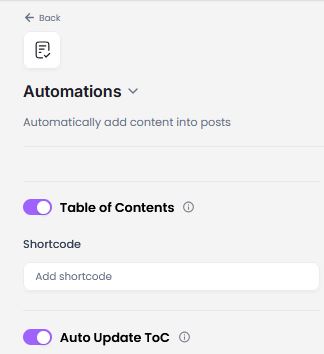
The Table of Contents is automatically generated when this option is enabled in your project settings.
Here's how to turn on ToC:
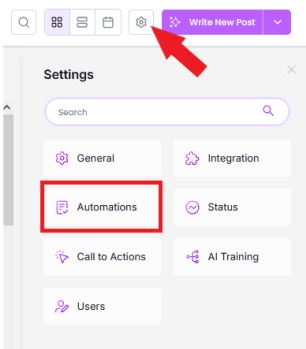
- Open the Project.
- Click the gear icon.
- Select Automations.
- Toggle the ToC button.
You can also manually add the ToC in case you didn't turn this feature on.
Here’s a step-by-step guide for manually adding a Table of Contents (ToC) to your article:
- Open the article where you want to add the ToC.
- Hover your mouse to the location where you'd like to insert the ToC.
- Click the "More Paragraph" icon in the floating toolbar.
- Click the "+" sign to reveal the ToC option.
- Select the ToC option to generate the Table of Contents in your article.

Was this article helpful?
Still stuck?