Link Your Shopify Store to BrandWell
BrandWell now integrates with Shopify. That means you can publish content from BrandWell straight to your Shopify site.
It's now available in the "Integrations" section of project settings. The app is "unlisted" on Shopify and accessed only through the BrandWell platform.
Our Shopify integration lets users publish their content directly on Shopify. After saving the details, the integration becomes active, allowing posts to appear on your Shopify site.
Here's how to get started...
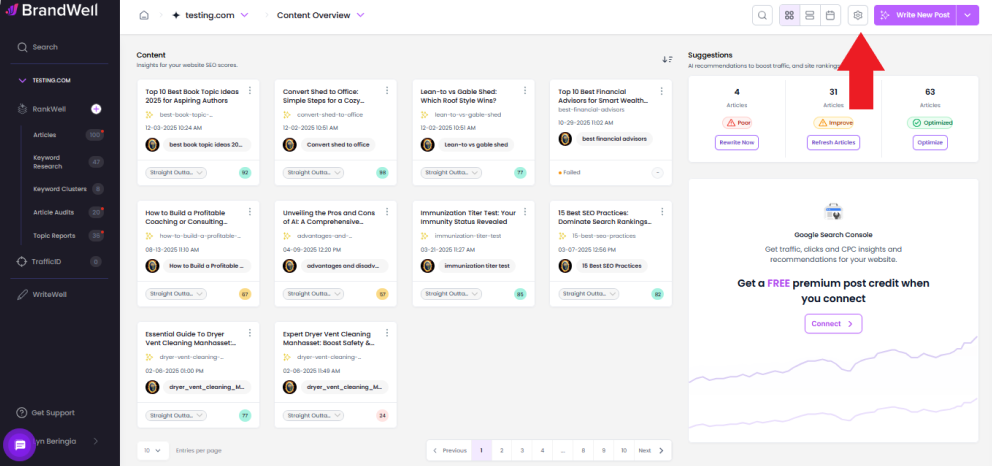
 Enter the project you want to link to your website, then click the gear icon in the upper right corner of the dashboard.
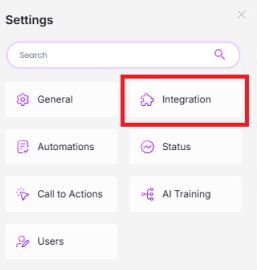
Click "Integration."
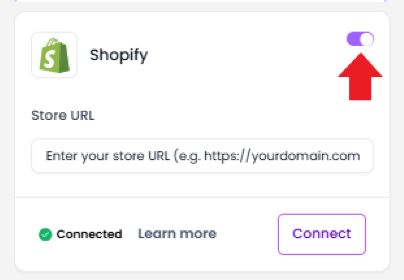
Scroll down to find Shopify, then switch the toggle on.
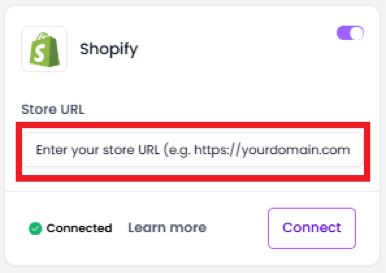
Input your store URL.
Click Connect.
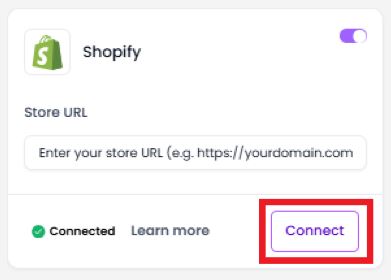
You will be redirected to Shopify for OAuth.
Once authenticated, Click Install Unlisted App.
On successful installation, you will be redirected to the BrandWell project where you started.
Choose any post in the project.
Once you click save, it will create a blog and article in the merchandiser store.
 That's it - you're done! You can now publish content from BrandWell directly to your Shopify store.
To successfully integrate BrandWell with Shopify, it's essential to use the correct Shopify URL, which should conclude with "_myshopify.com_".
You can easily locate this URL. In the Shopify sidebar, click on the eye icon next to the "_Online Store_".
Ex: https://[YOURDOMAIN].myshopify.com/
Was this article helpful?
Still stuck?