How to Identify and Filter Hot Leads Using TrafficID
In the fast-paced world of sales and marketing, identifying high-intent leads is crucial.
TrafficID’s Hot Identified Lead Filters (HILF) make it easy to pinpoint prospects who are ready to buy.
By leveraging behavioral data, you can filter and prioritize leads who are showing strong buying signals.
Key Indicators of a Hot Lead
 Return Visitors
Example: "This VP of Sales has visited 3 times this week."
- Heat Score: High
- Why it matters: Repeat visits indicate serious evaluation and intent to purchase.
 Scroll Depth
Example: "They read 85% of your pricing page."
- Buying Signal: Strong engagement with pricing pages often suggests budget authority.
 Time on Site
Example: "They spent 12 minutes reviewing your case studies."
- Insight Gained: Extended time spent on case studies suggests they are in the late stages of evaluation.
 Journey Tracking
Example: "They've viewed 6 different solution pages."
- Behavior Map: Features → Case Studies → Integration Docs → Pricing
- Intelligence: Prospects following this typical buying journey are likely making a purchase decision.
 Company-Wide Interest
Example: "Three decision-makers from IBM visited today."
- Buying Committee Alert: Multiple visits from the same company indicate internal discussions about your solution.
With these filters, you can ensure no lead is left behind, no opportunity is missed, and no gut decisions are needed.
How to Use TrafficID’s Hot Identified Lead Filters (HILF)
Overview:
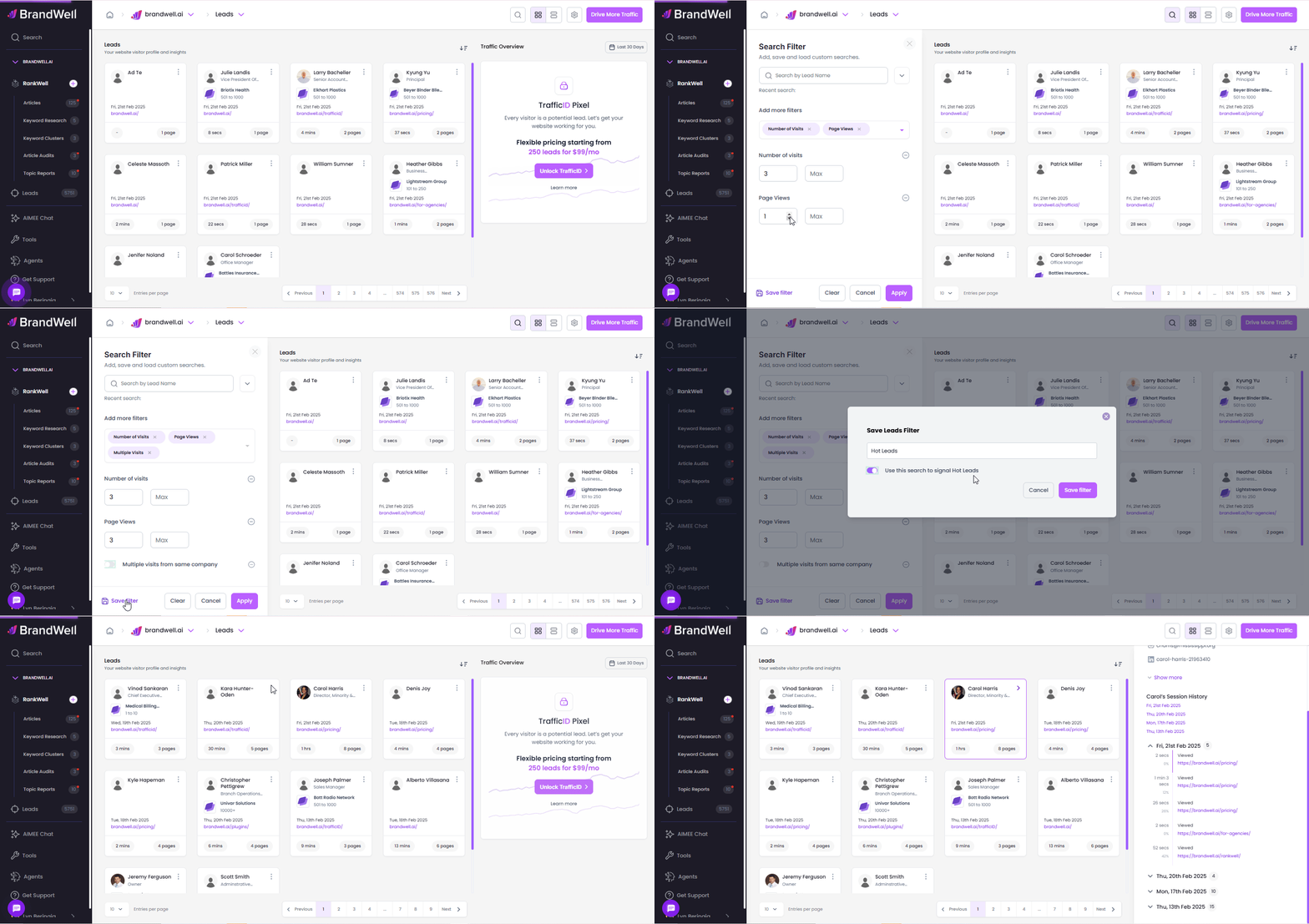
Follow these steps to identify high-intent leads:
 Click the
  magnifying glass icon in TrafficID.
Under “Add More Filters”, select options such as Multiple Visits, Number of Visits, Page Views, etc.
Adjust the number of visits/views based on your desired lead criteria.
Click “Apply” to filter results.
(Optional) Click “Save Filter” to reuse these settings in the future.
By implementing these filters, you can focus on leads that matter most and optimize your sales strategy for higher conversions. Start leveraging TrafficID today and transform the way you identify and engage with potential buyers!
Was this article helpful?
Still stuck?